The specialty referral workflow your clinic actually needs.
Diagonal connects every step of the referral process — from patient record and clinical documents to specialist reports and billing — so nothing falls through the cracks.
From referral to report — the complete workflow.
Create request
Select specialty, write clinical reason, attach documents, set priority.
Receive & accept
Full patient context, documents, and SLA countdown — ready to review.
Work on report
View DICOM images, draft the report in the rich editor, add conclusions.
Report delivered
Report visible to the vet. Invoice generated and linked automatically.
Request review
Vet can request changes — specialist revises and resubmits.
For imaging referrals, the vet can generate an AI-assisted clinical summary before sending the request.
Built around the way veterinary clinics actually work.
Every screen is designed for a specific moment in the referral workflow. Browse them to see how Diagonal fits into your day.
Browse available services, pricing, and turnaround times before referring.
Especialidades
Catálogo de servicios de especialidad y telemedicina
Send a structured referral in minutes, not emails.
Specialists see exactly what's assigned to them.
View and manipulate medical images directly in the browser.
Radiografia MPD lateral
19 mar
Radiografia MPD AP
19 mar
Ecografia abdominal
15 mar
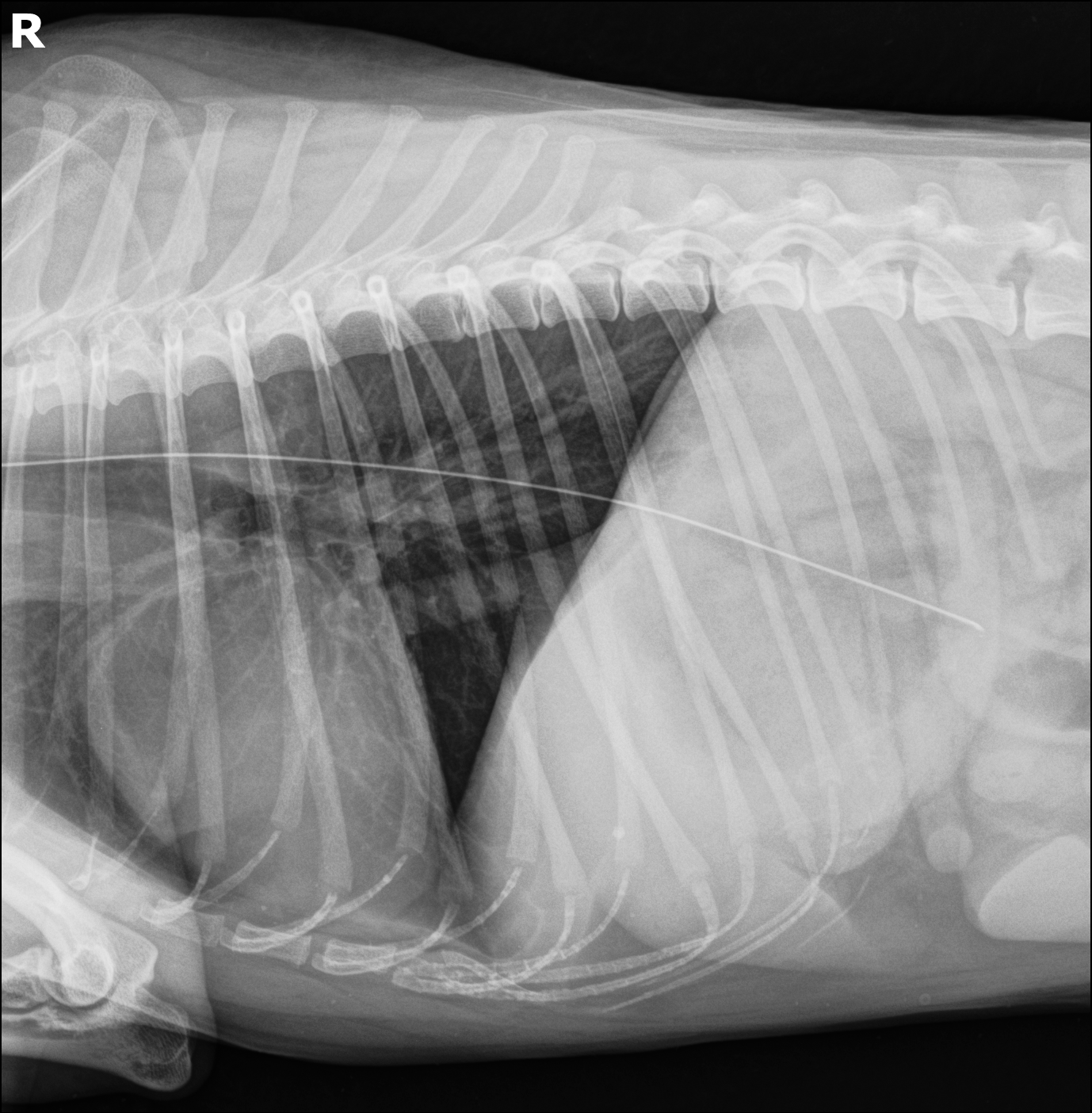
Imagen
Estudio
Contexto
Draft reports in a full-screen editor with three-panel layout.
Radiografía MPD lateral
RxAnalítica preoperatoria
LabEcografía abdominal
EcoConsentimiento informado
Doc1. Motivo de consulta
Acude a consulta de urgencias del HV Diagonal el martes, 19 de marzo de 2026 por cojera persistente en miembro posterior derecho de 2 semanas de evolución.
2. Anamnesis
Se presenta Max, canino macho de raza Golden Retriever de 10 años de edad y 32,5 kg de peso. El propietario refiere cojera progresiva en miembro posterior derecho de aproximadamente 2 semanas de evolución, de inicio insidioso, sin antecedente traumático conocido. Se ha observado mejoría parcial tras tratamiento antiinflamatorio con Meloxicam 0,1 mg/kg SID durante 5 días, aunque persiste claudicación al inicio de la marcha. Sin antecedentes clínicos relevantes en el momento de la consulta.
3. Exploración física general
En el momento de la consulta el paciente muestra un estado mental alerta. Sus mucosas son rosadas y húmedas, con un tiempo de relleno capilar inferior a 2 segundos. La auscultación cardiopulmonar es compatible con la normalidad, evidenciando una frecuencia cardíaca de 88 latidos por minuto y una frecuencia respiratoria de 22 respiraciones por minuto con un patrón ventilatorio normal. El abdomen es depresible a la palpación. En cuanto a la temperatura, se encuentra en 38,4°C, considerándose normotermia.
Comentarios para los tutores
Paciente: Max
Propietario refiere cojera en MPD de 2 semanas...
Se pauta Meloxicam 0.1mg/kg SID durante 5 días...
Solicitud de Traumatología: Planificación quirúrgica...
Generate clinical report drafts from the patient's history with AI.
Max
PerroGolden Retriever941000012345678Notas: Alergia a la penicilina. Carácter tranquilo.Juan Perez
+34 611 222 333
juan.perez@email.com
DNI: 12345678A
Registro cronológico de actividad clínica
Propietario refiere cojera en MPD de 2 semanas. Inicio insidioso sin traumatismo previo conocido.
Se pauta Meloxicam 0.1mg/kg SID durante 5 dias. Control en 1 semana.
Solicitud de Traumatologia: Planificacion quirurgica (URGENTE)
Generar informe con IA
Selecciona las entradas del historial a incluir y agrega contexto adicional si lo deseas.
Historial clínico
Propietario refiere cojera en MPD de 2 semanas.
Se pauta Meloxicam 0.1mg/kg SID durante 5 días.
Solicitud de Traumatología: Planificación quirúrgica.
Contexto adicional
Your clinic at a glance.
Dashboard
Resumen general de la clínica
One patient, one record. History, documents, and reports in the same place.
Max
PerroGolden Retriever941000012345678Notas: Alergia a la penicilina. Carácter tranquilo.Juan Perez
+34 611 222 333
juan.perez@email.com
DNI: 12345678A
Registro cronológico de actividad clínica
Propietario refiere cojera en MPD de 2 semanas. Inicio insidioso sin traumatismo previo conocido.
Se pauta Meloxicam 0.1mg/kg SID durante 5 dias. Control en 1 semana.
Solicitud de Traumatologia: Planificacion quirurgica (URGENTE)
Request a demo or get in touch.
Tell us a bit about your clinic and what you want to improve. We'll reply at info@diagonalapp.com.
What happens next
We’ll follow up to understand your workflow, answer questions, and schedule a demo if it makes sense.